Elton John - Flux.1 schnell
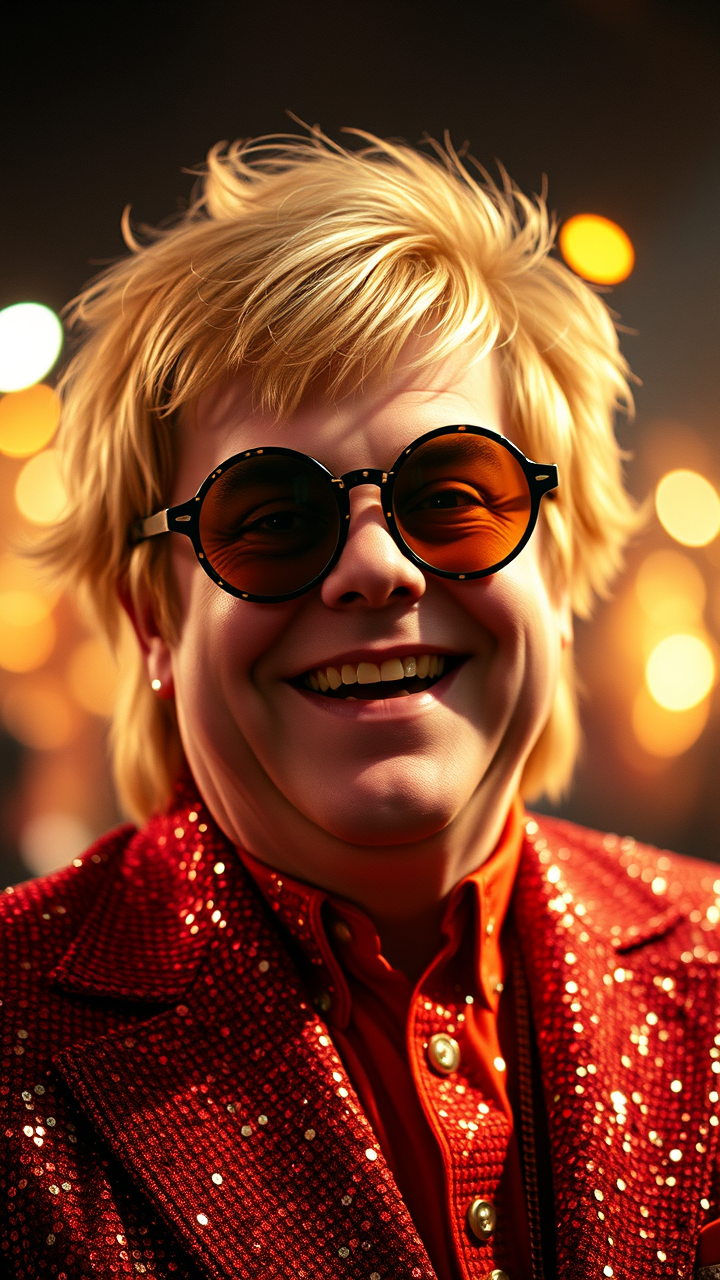
Eingabe
**Prompt:** "Create a hyper-detailed portrait of Elton John in his iconic 1970s glam-rock era, wearing his signature sequined jumpsuit and oversized, flamboyant glasses. Capture his expressive face with sharp cheekbones, a warm smile, and twinkling eyes behind round, tinted lenses. Highlight his voluminous, feathered blonde hair styled in his classic retro look. Use dramatic, stage-like lighting with a soft spotlight effect, casting subtle shadows that enhance his facial contours. The background should be a shimmering, bokeh-filled concert ambiance with faint hints of a cheering crowd. Render the image in a high-resolution, cinematic style with a slight vintage film grain, mimicking the warmth of 35mm Kodak film. Opt for a mid-close-up shot with a 50mm lens for natural depth, ensuring vibrant colors and intricate fabric textures. The mood should be joyful, energetic, and larger-than-life, embodying his legendary stage presence." (999 characters)
Detaillierte Analyse des Flux KI Image Prompt
Analysiere den detaillierten Prompt, der zur Erstellung des Bildes mit dem Flux KI Image Generator verwendet wurde.
Flux-Prompts für den KI-Bildgenerator erkunden
Wie man ein Bild generiert von Flux.1 schnell
Folge diesen vier einfachen Schritten, um das gewünschte Bild zu erstellen.
Schritt 1: Gib deinen Text ein (Fühle dich frei, deinen Prompt für bessere Ergebnisse zu verfeinern)
Schritt 2: Wähle das Bildseitenverhältnis
Schritt 3: Wähle dein Flux-Modell:
Schritt 4: Klicke auf die Generieren-Schaltfläche und warte ein paar Sekunden auf dein Bild
Verwandte Flux KI Tools für Prompts über Flux.1 schnell
Entdecke fortschrittliche Tools von Flux KI, um deinen kreativen Workflow zu verbessern.