Flux.2 Pro AI Image Generator
Flux.2 Pro is the new powerful image generation model from BlackForestLabs in the Flux AI series. This advanced model offers high-precision image editing and generation for demanding scenarios—delivering exceptional structure retention, alignment with brand guidelines, natural language-based control, and refined detail preservation.
Introduction about Flux.2 AI Models
A production-level AI image generation and editing model capable of outputting 4MP photorealistic images with multi-reference control.
Flux.2 Pro
Delivers stable, high-detail, production-ready images. Ideal for professional projects and long-term content creation.
Flux.2 Dev
Lightweight and fast for sketch-level outputs, rapid prototyping, and frequent prompt testing.
Flux.2 Flex
Offers enhanced style flexibility and controllability, perfect for exploring diverse visual directions and creative experiments.
Samples Images generated by Flux 2 Pro AI
Showcases results of Flux 2 Pro across various content densities, structural complexities, and stylistic demands—demonstrating stable performance in lighting, materials, and composition.
Stable Multi-Image Fusion
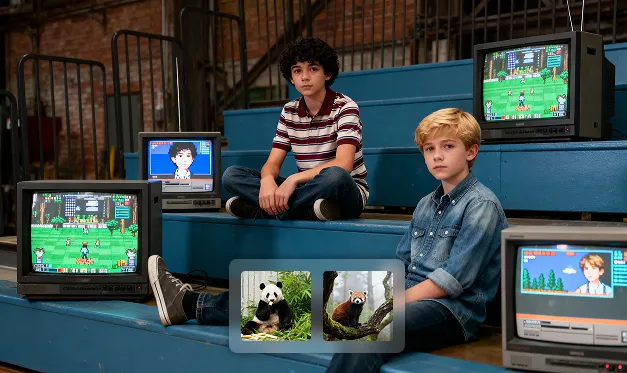
Source Image

Replace the child in the image with the animals from Figures 2 and 3. Adjust the animals' positions and styles to blend them naturally into the scene. Adjust the proportions of the animals relative to each other and the surrounding space.
Precise Image Editing
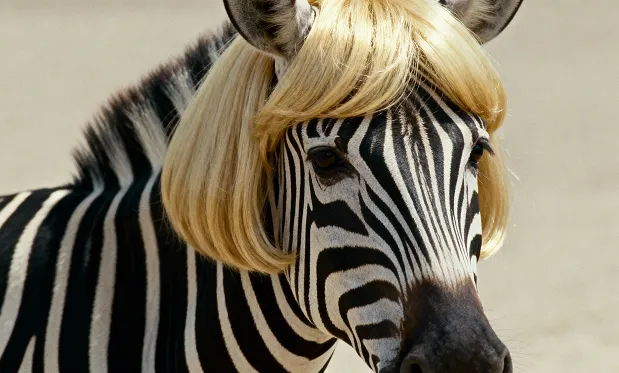
Source Image
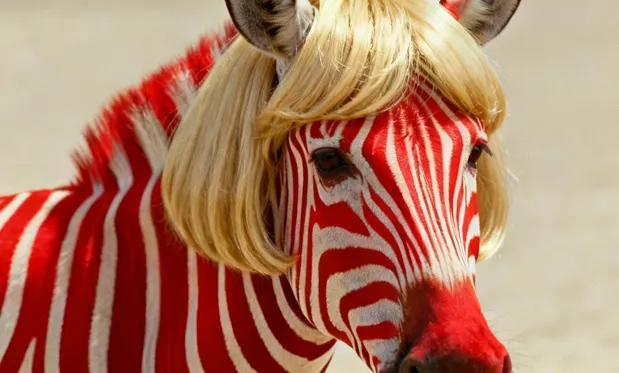
Change the zebra's black stripes in the picture to red.
High-Definition Photoreal Style

A cinematic close-up portrait of a woman with loose, windswept ginger hair and freckles, standing in a snowy environment under strong sunlight. The lighting creates highlights in her hair and soft natural shadows on her face. In the background are snowy mountains and a gradient blue sky fading toward the horizon. She is wearing a denim jacket with a green and white scarf tied around her neck. The composition is intimate, captured from a slightly side profile, with shallow depth of field and a warm film-like aesthetic, sharp and clear with rich textures.
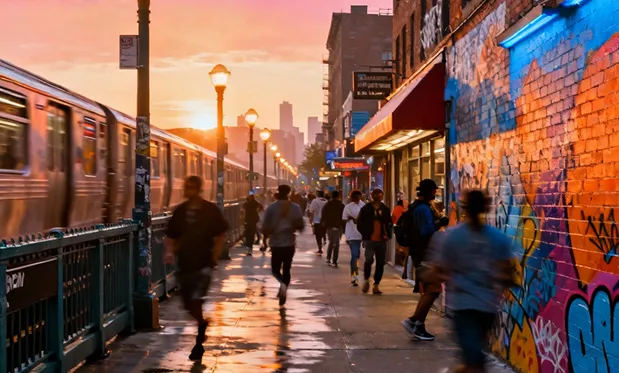
A vibrant urban street scene at sunrise, glowing streetlights fading into warm morning light, bustling city corners, colorful murals and brick walls, dynamic pedestrians and subtle motion of subway trains, soft reflections on wet pavement, a feeling of hope, energy, and community, modern hip-hop vibe, bright and uplifting color palette, cinematic perspective, detailed city textures.
Core Features of Flux 2 Pro AI
Designed for scenarios that demand stable performance, Flux 2 Pro offers structure preservation, detail enhancement, and controllable repeat generation—empowering content teams to reduce trial and error for complex tasks.
Consistent Output Quality
The model utilizes a fixed generation strategy, delivering similar visual characteristics across different batches and themes. Perfect for work environments with multiple review rounds or repeated output requirements.
Deterministic Inference Process
Achieve uniform image quality without configuring step counts or fine-tuning parameters. Minimizes inconsistencies from user-to-user parameter drift, streamlining team collaboration.
Enhanced Text Comprehension
The model interprets instructions for multi-subject, complex arrangements, or lengthy descriptions more clearly—maintaining scene and structural stability, and reducing misalignment or chaos.
Controllable Repeat Generation
Seed-based repetition lets you fine-tune the same concept along multiple directions. Ideal for large-batch asset production, A/B testing, or projects requiring unified style.
Advantages of Flux 2 Pro AI Image Generator
With built-in optimization strategies, Flux 2 Pro is ideal for 'stable output' workflows—minimizing reliance on trial-and-error and still delivering superior image quality.
Reliable High-Fidelity Detail
Maintains detail in textures, lighting, and subject edges for more natural visuals at higher perceived resolution—great for showcase-oriented content.
Stable Performance at Scale
Keeps key visual traits consistent across high-volume production to mitigate project risks posed by randomness, supporting predictably high-quality workflows.
Copy-Driven Creativity
Natural language descriptions alone drive the generation process, without manual fine-tuning. Effortlessly explore variations in different creative directions.
Output Formats for Standard Workflows
Exports in commonly used formats that flow directly into design, publishing, or approval pipelines—no conversion necessary.
Application Scenarios for Flux.2 Pro AI Image Generator
Ideal for content systems, brand assets, or creative projects with demanding detail and long-term requirements—helping teams achieve more stable results on a tight schedule.
Quickly generate stylistically consistent product shots, mood images, and campaign visuals for brand ecosystems—minimizing rework and review cycles.
Brand Assets and Promotional Visuals
Supports holiday, event, or major promotional imagery—maintaining high detail while shortening production timelines.
Main Visuals for Campaigns
Maintains consistent subject structure and smooth transitions for tasks with people, closeups, or sequences—enabling reliable series outputs.
Portrait & Character Presentations
Handles images with multiple objects/characters or broad layouts, preserving clarity—enhancing narrative expression and ideal for concept art or presentations.
Complex, Creative Scenes
How to Use Flux 2 Pro AI: Step-by-Step Guide
Designed for creators needing high consistency, controllability, and image detail. Just follow these three easy steps:
Step 1: Enter Your Prompt
Step 2: Select Aspect Ratio
Step 3: Generate Your Image