Leonardo da Vinci - Flux.1 schnell
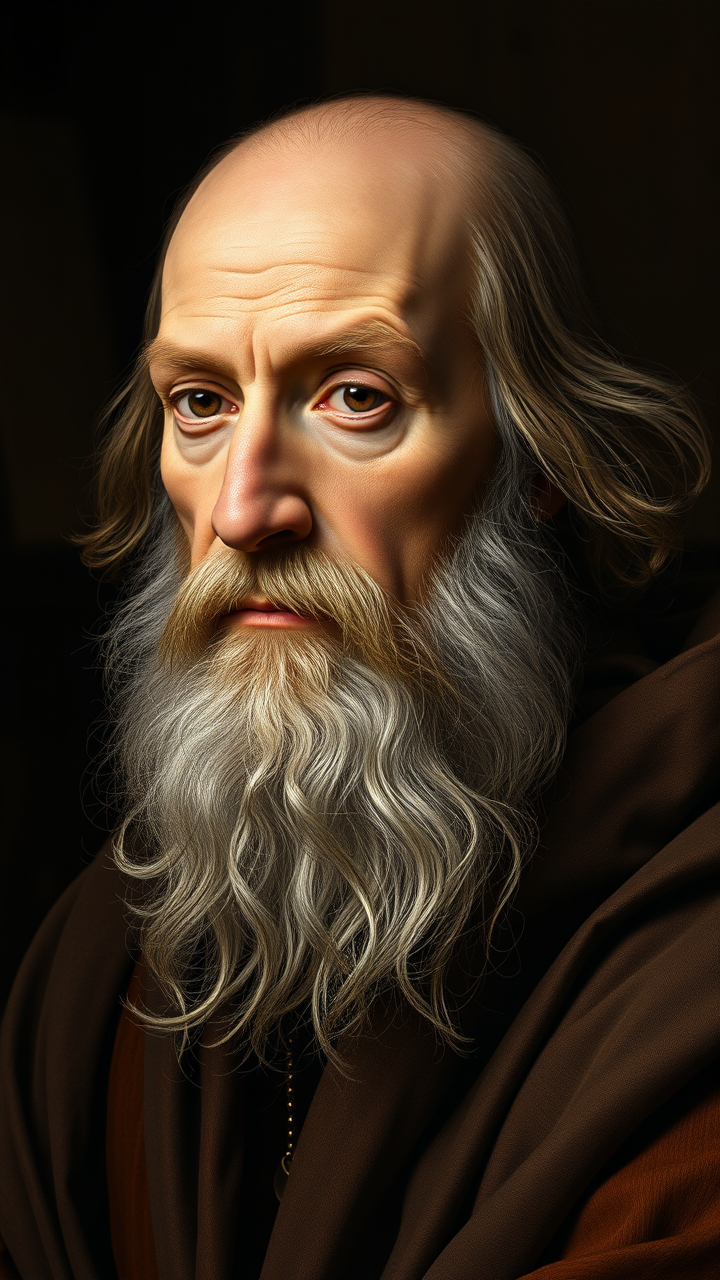
Leonardo da Vinci
ความละเอียด: 720x1280ขนาดภาพ: 1441.4 KBเวลาสร้าง: 2025 / 07 / 27

พรอมต์

**"Generate a highly detailed Renaissance-style portrait of Leonardo da Vinci, capturing his wise and contemplative expression. His face should have sharp, intelligent features—a prominent nose, deep-set eyes, and a flowing white beard. Light him with soft, diffused chiaroscuro lighting, emphasizing the texture of his aged skin and the folds of his robes. The background should be muted and dark, evoking his workshop with subtle hints of parchment and scientific instruments. Render the portrait in a masterful oil-painting style, with rich brushstrokes and warm, earthy tones. Use a close-up, three-quarter view with a 50mm lens effect for intimacy. The mood should be scholarly yet enigmatic, reflecting his genius. Ultra HD, hyper-realistic details, 8K resolution."**

โมเดล
Flux.1 schnell
ลายน้ำ:
ลิขสิทธิ์: ผู้ใช้ที่ชำระเงินเป็นเจ้าของสิทธิ์ในภาพของตน
ส่วนลด 20% สำหรับแผนรายปี

การวิเคราะห์รายละเอียดของ Prompt ภาพ Flux AI

วิเคราะห์ Prompt รายละเอียดที่ใช้ในการสร้างภาพด้วย Flux AI Image Generator.

หัวข้อภาพ : Leonardo da Vinci
Prompt : **"Generate a highly detailed Renaissance-style portrait of Leonardo da Vinci, capturing his wise and contemplative expression. His face should have sharp, intelligent features—a prominent nose, deep-set eyes, and a flowing white beard. Light him with soft, diffused chiaroscuro lighting, emphasizing the texture of his aged skin and the folds of his robes. The background should be muted and dark, evoking his workshop with subtle hints of parchment and scientific instruments. Render the portrait in a masterful oil-painting style, with rich brushstrokes and warm, earthy tones. Use a close-up, three-quarter view with a 50mm lens effect for intimacy. The mood should be scholarly yet enigmatic, reflecting his genius. Ultra HD, hyper-realistic details, 8K resolution."**
ขนาด
720x1280
โมเดล
Flux.1 schnell
ราคา
10 เครดิต/ภาพ
รูปแบบ
image/png
หมวดหมู่

สำรวจคำแนะนำ Flux สำหรับตัวสร้างภาพ AI

ค้นพบคำแนะนำเพิ่มเติม

วิธีสร้างภาพโดย Flux.1 schnell

ติดตามขั้นตอนง่าย ๆ สี่ขั้นตอนเพื่อสร้างภาพที่คุณต้องการ.

ขั้นตอนที่ 1: ป้อนข้อความของคุณ (สามารถปรับแต่ง Prompt ของคุณเพื่อผลลัพธ์ที่ดียิ่งขึ้น)

ขั้นตอนที่ 2: เลือกอัตราส่วนภาพ

ขั้นตอนที่ 3: เลือกโมเดล Flux ของคุณ:

ขั้นตอนที่ 4: คลิกปุ่มสร้างและรอสักครู่เพื่อรับภาพของคุณ

เครื่องมือ Flux AI ที่เกี่ยวข้องกับ Prompt เกี่ยวกับ Flux.1 schnell

ค้นพบเครื่องมือขั้นสูงจาก Flux AI เพื่อเพิ่มประสิทธิภาพการทำงานสร้างสรรค์ของคุณ.

เครื่องมือ Flux AI

เครื่องมือสร้างภาพ Flux AIเครื่องมือสร้างวิดีโอ Flux AIภาพสู่ภาพ AIFlux Kontext AIเครื่องสร้างภาพ Nano Bananaเครื่องสร้างอวตาร AIภาพถ่ายเป็นการ์ตูนถ่ายภาพสินค้าด้วย AIAI ลองเสื้อผ้าเสมือนจริงเครื่องมือฟื้นฟูภาพถ่ายเก่าเครื่องสร้างภาพถ่ายหน้าตรงด้วย AIเครื่องสร้างทรงผมด้วย AIสตูดิโอศิลปะจิบลิเครื่องเปลี่ยนพื้นหลังด้วย AIเครื่องมือเพิ่มสีรูปภาพด้วย AIเครื่องมือลบวัตถุออกจากรูปภาพเครื่องมือสร้างอะนิเมะ AIเครื่องมือสร้างฟิกเกอร์แอคชั่น AIเครื่องมือสร้างกล่องตุ๊กตาบาร์บี้เครื่องสร้างตุ๊กตาผ้า AIเครื่องสร้างสไตล์ซิมป์สันส์ AIStudio Ghibli AINano Banana อินเพ้นท์เครื่องกำเนิดโปสเตอร์ AIQwen Image AIFlux สมจริงGoogle Imagen4 AISeedream 4.0 ภาพ AIแก้ไขภาพ QwenFlux Krea AIGemini Flash แก้ไขรูปภาพเครื่องมือสร้างภาพ Recraft AIเครื่องมือสร้างภาพ Flux LoraFlux Redux AIFlux Fill AIFlux Canny/Depth AIเครื่องมือสร้างเหรียญ AIKrea AIปฏิทินปีใหม่ AIเครื่องสร้างภาพฮาโลวีนด้วย AI

บทความที่เกี่ยวข้องกับ Prompt Flux.1 schnell