《Sailor Moon》-Mamoru Chiba - Flux.1 dev
prompt
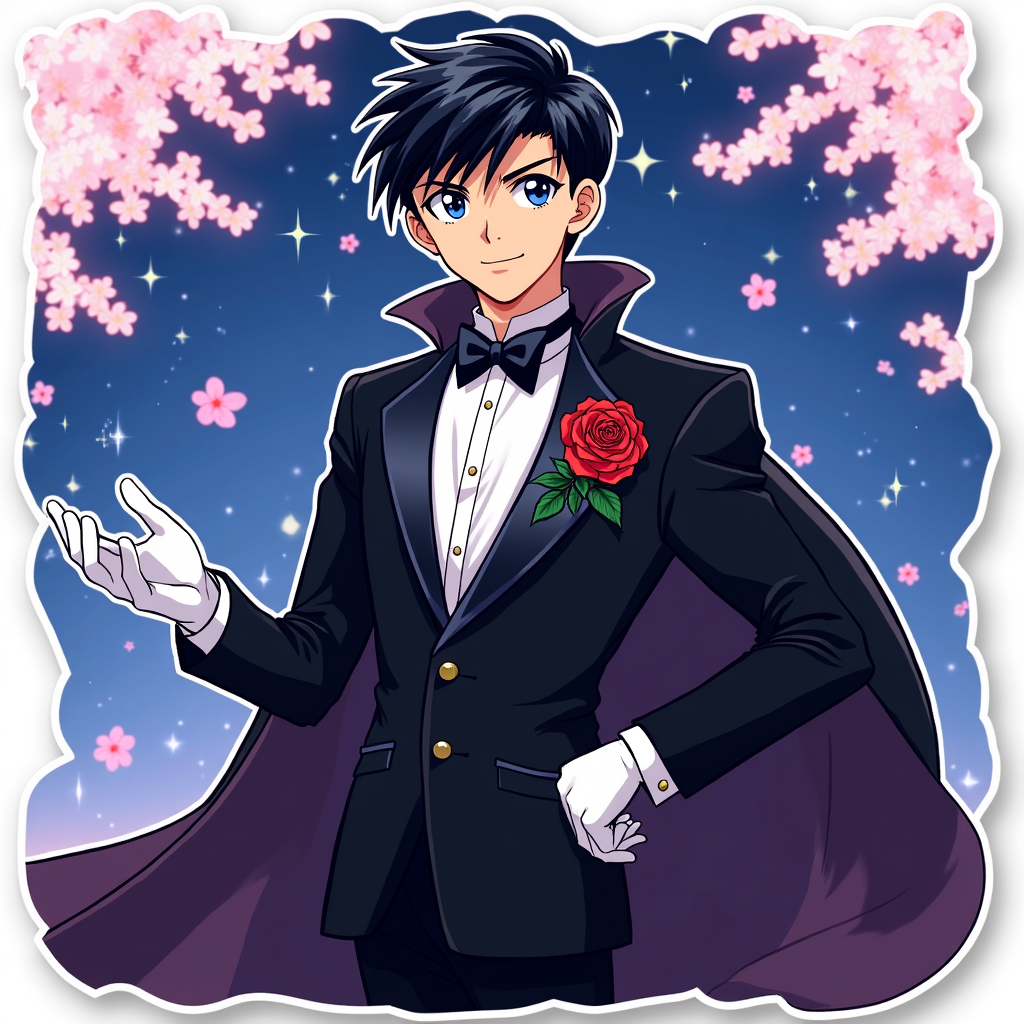
**Prompt:** *"Anime sticker style illustration of Mamoru Chiba (Tuxedo Mask) from 《Sailor Moon》, featuring his sharp, mature facial features, short dark hair, and piercing blue eyes. He wears his signature black tuxedo with a flowing cape, white gloves, and a red rose pinned to his lapel. His pose is confident—leaning slightly forward, one hand holding a rose, the other outstretched as if casting a spell. His expression is cool and composed, with a faint smirk. The background is a dreamy, starry night sky with cherry blossoms drifting by. Stylized with bold outlines, vibrant colors, and a semi-flat, glossy sticker effect. Include subtle sparkles and a soft glow around his cape for a magical touch."* (997 characters)
Analisis Terperinci Prompt Gambar Flux AI
Analisis prompt terperinci yang digunakan untuk menghasilkan gambar dengan Generator Gambar Flux AI.
Jelajahi Prompt Flux untuk Generator Gambar AI Flux
Cara menghasilkan gambar dengan Flux.1 dev
Ikuti empat langkah sederhana ini untuk membuat gambar yang Anda inginkan.
Langkah 1: Masukkan Teks Anda (Silakan sempurnakan prompt untuk hasil yang lebih baik)
Langkah 2: Pilih Rasio Aspek Gambar
Langkah 3: Pilih Model Flux Anda:
Langkah 4: Klik Tombol Buat dan Tunggu Beberapa Detik untuk Gambar Anda
Alat Flux AI terkait untuk prompt tentang Flux.1 dev
Temukan alat-alat canggih dari Flux AI untuk meningkatkan alur kerja kreatif Anda.